This tweak is for broad band cable connections on stand alone machines with WinXP professional version - might work on Home version also. It may also work with networked machines as well. This tweak assumes that you have let WinXP create a connection on install for your cable modem/NIC combination and that your connection has tcp/ip - QoS - file and print sharing - and client for Microsoft networks , only, installed. It also assumes that WinXP will detect your NIC and has in-box drivers for it. If it doesn't do not try this. In the "My Network Places" properties (right-click on the desktop icon and choose properties), highlight the connection then at the menu bar choose "Advanced" then "Advanced Settings". Uncheck the two boxes in the lower half for the bindings for File and Printer sharing and Client for MS networks. Click OK.
Saturday, April 19, 2008


Thursday, April 10, 2008
System History Cleaning Studio 5.0.3.3
| ||
 | ||
 Your computer stores more information than you think. All over your hard drive is information about the sites you’ve visited, files you’ve opened, and people you’ve e-mailed. Automatic Windows and Internet Washer cleans any evidence of your Internet and Windows habits. You can have it run on schedule to automatically clean system in stealth mode, as well as on Windows start-up and shutdown. Internet/System History Cleaning Studio will help you clean system and erase the IE history, cache, cookies, typed URLs, auto complete history, and Window’s temporary folder, run history, search history, open/save history, recent documents, etc. Using this application, you no longer have to worry about track history access by others who use your computer! It provides you with the peace-of-mind knowing that your personal activity and information will remain private and protected, and allow you to define different erasing schema in different profiles, after that, you can easily select the profile to do the track erasing. With it, you could surf with confidence and speed up computer speed! Links: http://w13.easy-share.com/1700085370.htm http://rapidshare.com/files/106004867/Sys_His_Clean_Studio_5.rar |
How To Select, Copy & Paste Text In Command Prompt
If you are a fairly advanced computer user you must be using DOS command prompt now and then to get things done, in this post you will see how to get copy and paste functionality in the DOS box.
- Launch Command prompt by pressing WINDOWS + R key.
- Type in cmd and press ENTER
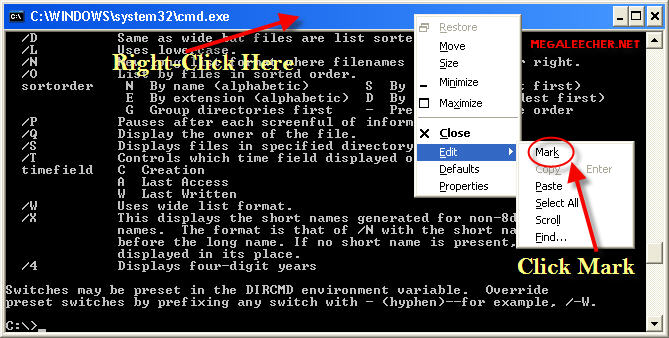
- Right Click anywhere in window (see image below)
- Select Mark or Edit > Mark (If used the title bar control menu)
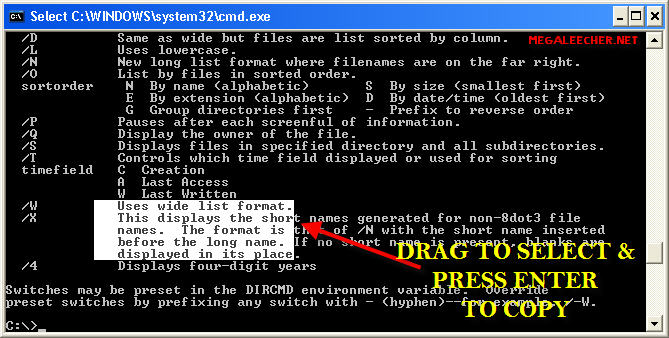
- Highlight desired text.
- Press ENTER to copy text to clipboard.
Same method can be used to paste text into the DOS window, just select the Paste option from the right-click menu.
Subscribe to:
Posts (Atom)

